Essential Wi-Fi security for business: what to set, and what a survey finds
What to set on each business network, from WPA3 and per-device logins to retiring WEP, and how a Wi-Fi survey finds rogue access points and weak settings.

In this article
The short answer: run staff networks on WPA3, put devices that can only manage WPA2 (with AES) on a network of their own, and switch WEP and the original WPA off. Give each person and handheld its own login rather than a shared password, replace every default, keep firmware current and train staff to spot phishing. Then survey the live network, because rogue access points and weak settings show up there, not in the paperwork.
For most businesses, Wi-Fi has gone from a convenience to a necessity. Staff work, collaborate and reach their systems over it from anywhere on site, and in a warehouse the scanners run on it: when it stops, picking stops. Keeping it secure is part of running the site. Data breaches and malware are a growing threat that can start over the air: in the government's Cyber Security Breaches Survey 2024, half of UK businesses, and 74% of large ones, reported a breach or attack in the previous 12 months. Closing the wireless route protects the business's information and keeps it operating.
How an attack through Wi-Fi unfolds
Large sites and factories face three risks every day, usually as stages of one incident. Picture a distribution warehouse running its scanners, office PCs and label printers on one network.
Unauthorised access: the way in
Wi-Fi does not stop at the wall, so anyone in the car park with a laptop can see your network and try it. Without adequate protection there is usually a weakness to exploit: a WEP network kept for an old label printer, or one passphrase on every scanner that several leavers still know. Once inside, an intruder can copy sensitive data, compromise the integrity of your systems by quietly changing stock levels and pick lists, and launch attacks on everything else the network reaches.
Data breaches: what they take
Poorly secured Wi-Fi is a route to the information itself: confidential detail of how the factory operates (orders, pricing, specifications), employee records (payroll, bank details) and customer information (contacts, delivery addresses). The cost is financial loss, from investigation to lost business, and damage to your reputation. In the UK there is also a deadline: a personal data breach that puts people at risk must be reported to the ICO within 72 hours of you becoming aware of it, and if the risk is high, the people affected must be told too.
Malware injection: what they leave behind
An unsecured network lets attackers inject malware into the devices on it, and each infected device becomes a launch pad for further attacks or compromises the integrity of the network itself. Ransomware that reaches the warehouse management system stops every scanner, and nothing ships until it is restored. Separate networks with rules between them (the table below) keep one infected laptop a single problem.
The measures that protect your data and your customers' trust
Use WPA3, with WPA2-AES as the floor
Encryption scrambles the data passing between each device and the access point, making it far harder for anyone in range to intercept and decode. How much harder depends on the version. WPA3, introduced in 2018, closes the WPA2 weaknesses that matter on a working site:
- A shared passphrase stops being a master key. On WPA2-Personal, anyone with the passphrase, a leaver included, can decode any connection they record, and a recording of a device joining can be tested against passwords offline without limit. WPA3-Personal's handshake (SAE) closes both: even with the passphrase, a listener cannot work out a connection's key, and gets nothing to test.
- Forged disconnects are blocked. WPA3 makes Protected Management Frames (PMF) compulsory. Without them, fake "disconnect" messages from one laptop can knock an aisle of scanners offline, or push them towards a fake access point.
WPA3 has had flaws of its own (the Dragonblood weaknesses in SAE, published in 2019, mostly closed by updates), so it is only as strong as the firmware at both ends. Where devices cannot do WPA3, WPA2 with AES is the floor; on the 6 GHz band used by Wi-Fi 6E and Wi-Fi 7, WPA2 is not permitted at all. And check encryption is actually switched on for every network carrying business data: it only stops unauthorised access and interception where it is enabled.
Retire WEP and the original WPA. WEP (Wired Equivalent Privacy) was superseded in 2004 and cracks in minutes; the first WPA (Wi-Fi Protected Access), built on TKIP, is deprecated too. Replace a device that can only do one of them rather than weaken the network for it.
Give every person and device its own login
For staff networks, use WPA3-Enterprise (WPA2-Enterprise for older devices). Through 802.1X and a RADIUS server, each person or device signs in with its own credentials, so a lost handheld or a leaver is shut out alone, without re-keying every scanner on site. The sign-in method (EAP) matters as much as the version:
- EAP-TLS: a certificate on each device, so there is no password to share or steal. The strongest choice, and it suits handhelds run from a device-management tool.
- PEAP with a username and password: acceptable only if every device checks the server's certificate. Without that check, a fake access point using your network name collects a login exchange (MSCHAPv2) that can be cracked offline.
- LEAP and EAP-MD5: obsolete. Switch them off.
Test roaming before a warehouse moves over. A scanner travelling down the aisles hands over between access points, and a full 802.1X sign-in at each one adds a delay some scanner applications do not tolerate. Fast roaming (802.11r) or key caching, on at the access points and supported by the devices, avoids it. Walk the aisles with the real handhelds before go-live.
Avoid "transition" mode (WPA2 and WPA3 under one network name) on the staff network, as it invites a downgrade attack: a fake access point offering your network name with WPA2 only can pull WPA3-capable devices back to the old handshake, which on a passphrase network hands the attacker a recording to guess offline. Give devices that cannot do WPA3 their own network instead. Most sites need no more than this:
| Network | For | Set it to |
|---|---|---|
| Staff | PCs, phones and scanners that support WPA3 | WPA3-Enterprise, EAP-TLS where devices can take a certificate |
| Legacy | Older scanners and printers | WPA2 with AES (Enterprise if they support it), reaching only the systems they need, with a replacement date and WPA3 in the replacement's spec (every device certified for Wi-Fi 6 has to support it) |
| Guests | Visitors and contractors | WPA3-Personal (transition mode is acceptable here for older visitor devices, as the passphrase is shared anyway), internet only, passphrase changed on a schedule |
| WEP, TKIP, or open with business data on it | Nobody | Switch it off |
Replace the default network name and passwords
Change the SSID (Service Set Identifier, the network name devices see) to your own: a default name often gives away the make of equipment, and with it the published default passwords to try first. Replace the default password with a strong, unique one mixing letters, numbers and symbols. WPA2 accepts 8 to 63 characters; use the long end, because length beats cleverness. Change the admin logins on the access points too.
Train your staff on what they will actually meet
Start with a proper session on why Wi-Fi security matters and what an unsecured network risks, using your own site: what a breach would cost, and each person's part in keeping company data confidential, intact and available. Then teach them to recognise and respond to the threats they will meet, phishing first: in the same 2024 survey it was by far the most common, reported by 84% of the businesses that had a breach or attack.
- Phishing: fraudulent emails and websites that trick people into revealing sensitive information. On Wi-Fi the classic is a page that pops up on joining and asks for the network or email password.
- Real-looking examples to practise on: "the Wi-Fi password changes on Monday, confirm your login here", a link whose address does not match the sender, a "new network settings" attachment.
- Things that do not belong: a network such as
Warehouse-Staff-2appearing besideWarehouse-Staff, or a box nobody recognises on a racking upright with a cable in it.
Give one route for reporting any of these to the IT department promptly, poor signal included: a dead spot nobody fixes is what tempts someone to plug in their own extender.
What a Wi-Fi survey finds
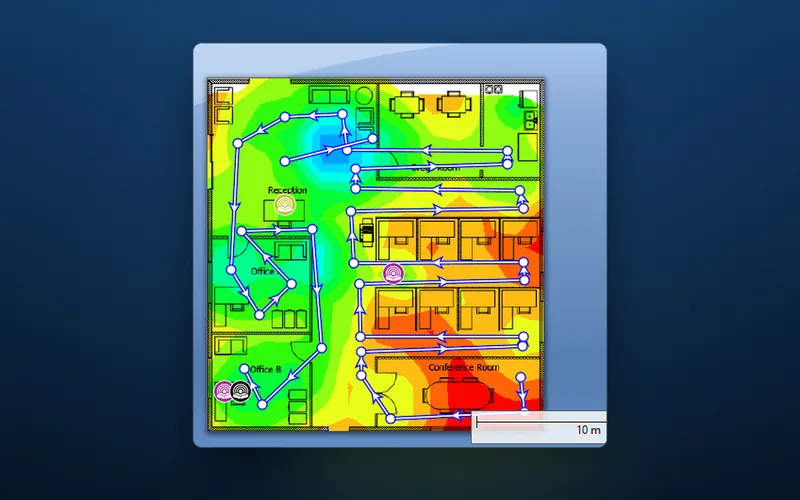
A survey checks the network on site, as it really is, so vulnerabilities and threats are found early and dealt with before anyone exploits them. It scans every channel in each band you use (in the UK, all 13 at 2.4 GHz, not just the usual 1, 6 and 11, as a unit someone plugs in can sit on any of them) and compares every access point it hears, by name, security setting and signal, with what should be there. Anything that deviates is a lead: an access point nobody can account for, a network that should have been switched off, WPA2 where WPA3 was specified.
Rogue access points
The most significant find is an unauthorised access point or other rogue device, known as a rogue AP. Some are brought in by employees meaning well: a cheap unit cable-tied to the racking where scanners kept dropping out, or a plug-in extender in a listed building where new cable is hard to run. Others are planted by someone who wants in. Either kind is an entry point for cyberattacks, outside the encryption and access rules on your real access points, through which an attacker can infiltrate the network and compromise sensitive data.
The network in the next unit on the estate is an interference question, not a threat. What matters is an unknown access point wired into your network, or any radio you do not own broadcasting your network name (an "evil twin", set up to lure your devices). Signal readings across the site narrow down where each one is so it can be physically located and removed, which in a high-bay warehouse can mean a lift to the top of the racking. Then close the route with access control measures:
- On the network: 802.1X on the staff Wi-Fi and, where the switches support it, on the wired ports, with unused ports switched off.
- On the wall: in a warehouse or foundry, access points usually sit high on steel. In a school corridor or hotel landing anyone can reach one, and the cable behind it is a live connection into your network, so mount it out of reach or in a locked enclosure.
Weak settings and old firmware
The same survey picks up the quieter problems: weak encryption protocols (a forgotten network on WEP or TKIP, transition mode left on after the last old scanner went), outdated firmware or software, and configuration errors that expose the network, such as a guest network that can reach the office systems.
Firmware matters because the best-known Wi-Fi flaws were fixed by updates. KRACK, the 2017 flaw in WPA2, mainly attacks the connecting devices: some access points can be set to shield devices that were never patched, but the real fix is updating the scanner or laptop itself. Cyber Essentials, the UK government-backed scheme, expects critical and high-risk updates within 14 days of release: a sensible target for access points and devices whether you hold the certificate or not.
Ready to secure your business Wi-Fi network?
Start today: list every network name on site with its security setting, then deal first with anything on WEP, TKIP or no encryption that carries business data. Then book a survey if any of these is true:
- Something on that list is a mystery: a network or access point nobody can account for, above all a name close to your own.
- Someone has fixed a dead spot themselves, or one aisle keeps dropping scanners. Both are where rogue units come from.
- The site or its devices have changed: new racking or a mezzanine, an extension, a new fleet of handhelds, a move to WPA3 or 6 GHz.
- Nobody holds the admin logins, because an installer or a former IT provider set the network up.
Threats move on: KRACK and Dragonblood were both found in standards already trusted and in use. So DW WiFi tailors each job to the site in front of it (its networks, the devices that depend on them, the building they sit in) and checks it against today's threats, to protect the network infrastructure the business runs on. A Wi-Fi Health Check is a verification survey with spectrum analysis plus a full assessment of the access points' configuration, with a report of the issues found and what we recommend. To book one or talk your site through, get in touch with DW WiFi.