What defines Wi-Fi quality? The five factors that decide it
Coverage, speed, security, signal-to-noise ratio and channels decide whether business Wi-Fi performs. The target for each, and how to tell which one is failing.

In this article
Good Wi-Fi is not a full set of bars on a phone. It is every device getting a strong, clean signal on a channel it is not fighting over, with enough airtime, securely, wherever it is used and at the busiest time of day. With the right setup and management a business network is secure, dependable and fast; get one factor wrong and it suffers lag, instability or weak connectivity, often in only one part of the site.
Every business relies on that, whatever the industry: offices, retail spaces and public areas, and above all warehouses and factories, where a handheld scanner stops working the moment the signal does. Wi-Fi is radio, built to the IEEE 802.11 standards and carried on radio waves that walls absorb and metal reflects, so performance depends on how the network is designed and how many people share it. A network that meets your requirements and runs efficiently starts with understanding these five factors, before anything is bought.
| Factor | Aim for | Usual culprit when it fails |
|---|---|---|
| Coverage | -67 dBm or stronger (nearer zero) at the device, wherever voice, scanners or roaming are used | Too few access points, or in the wrong places |
| Speed | Channel utilisation under 50% at the busiest time | Too many devices per access point; slow, older devices |
| Security | WPA3 on every SSID, WPA2 only for devices that cannot run it | Shared passphrases, old settings, out-of-date firmware |
| SNR | 25 dB or more | Interference, obstructions, neighbouring networks |
| Channels | 2.4 GHz on 1, 6 and 11 only; 20 or 40 MHz wide on 5 GHz in dense sites | Access points on the same or overlapping channels |
The five pull against each other, so they are designed together. Add access points for coverage without a channel plan and they interfere with each other; turn the power up to reach a dead zone and the access point is heard further away than its devices can reply from; bond channels for speed and fewer are left to go round.
1. Coverage (range)
Good coverage is a strong, consistent signal across the whole premises, so staff and customers connect reliably wherever they are: the corner office, the conference room, the public areas, the top of the racking. Dead zones, where the signal is weak or missing, interrupt work and communication: a scanner stalls halfway down an aisle, a call drops on the stairs. The larger the building and the more storeys it has, the more coverage has to be planned rather than assumed.
Measure it where the devices are, at the height they are used: a reading at floor level says little about a scanner at the top of the racking. The usual scale is -67 dBm or stronger for voice, scanning and roaming, around -70 dBm for data alone, and by -80 dBm devices struggle to stay connected. Four traps catch most sites:
- The device has to answer. A scanner has less transmit power and a smaller antenna than the access point, so it can hear the access point while the access point cannot hear it. Set access point power to what the weakest device can match, and add access points rather than turning them up.
- The building changes. Racking and stock are part of the radio path, and water-heavy stock such as drinks or chilled food absorbs the signal. An empty warehouse can survey perfectly and fail once the pallets go in.
- Moving devices need somewhere to go. A forklift terminal must hear the next access point before the current one fades, so voice and roaming designs usually ask for a second access point at -67 dBm or better everywhere.
- The bands reach differently. 2.4 GHz travels further and through walls better than 5 or 6 GHz, so a site that is covered on 2.4 GHz can have gaps on the faster bands.
The dependable fix is more access points in the right places, sometimes with the right antenna: a directional antenna on a pan and tilt bracket, aimed down an aisle, puts the signal where the scanners are instead of into the roof. Each environment adds a constraint. Stainless walls in a food factory reflect the signal and washdown calls for IP-rated enclosures; a foundry adds heat, dust and heavy steel; a listed building has thick walls, and fixings may need listed building consent.
Mesh networking, where access points relay traffic to each other over the air, can extend coverage where no cable can be run. Treat it as the exception: every wireless hop costs throughput, and access points cabled back to the network (wired backhaul) remain the business norm.
2. Speed (bandwidth)
Bandwidth here means the capacity of the Wi-Fi itself, not your internet line. Data-intensive work needs plenty: video conferencing, large file transfers, cloud-based applications and real-time data analytics. With enough, they run without stalls, which is where the gains in productivity and user experience come from.
That capacity is shared, because devices on one channel take turns to transmit: a network that is quick on an empty site can crawl once the whole shift has logged on. Where device density is high, capacity is what lets everyone work at once without slowdowns, so plan from the devices in each zone at the busiest time, not from floor area. Thirty tablets loading one lesson video is a capacity problem, not a coverage one: at 3 Mbps each, the classroom needs 90 Mbps of real throughput, and real throughput is typically half the connection rate a device reports, or less.
The number to watch is channel utilisation, the share of time the channel is busy. Keep it under 50% at the busiest time; above that, the wait for a turn grows quickly. Two things waste airtime quietly: old or distant devices on low data rates, which hold the channel far longer to send the same data (switch off the oldest 802.11b rates once nothing on site needs them), and surplus SSIDs, each announcing itself about ten times a second at the slowest rate.
VoIP phones and IoT devices also depend on a fast, robust connection, though they use little bandwidth. Voice is the strictest: the usual targets are under 150 ms one-way delay, under 30 ms jitter and under 1% packet loss, so on a congested network the calls break up first.
3. Security
Your signal reaches the car park and the unit next door, and attacks on business networks are rising, so strong encryption is the starting point. Two security protocols provide it, WPA2 and the more recent WPA3; both encrypt the data crossing the network so nobody without the key can join or read it, and WPA3 adds protection against newer threats. A WPA2 passphrase can be guessed offline by anyone who records a device connecting; WPA3-Personal resists that, and WPA3 makes protected management frames compulsory, which stops forged disconnect messages knocking devices off. WPA3 is now the baseline, mandatory on 6 GHz and for Wi-Fi 7; keep WPA2 for devices that cannot run it, sharing one SSID through WPA3's transition mode.
Encryption is only as good as the access point configuration behind it:
- Every SSID uses up-to-date security settings and strong encryption, not just the main one.
- Staff devices use Enterprise mode (802.1X), each with its own login, so a lost scanner or a leaver means revoking one login, not re-keying every device. Any shared passphrase is long, random and complex.
- Guests get their own SSID, kept apart from the business network.
- Firmware is updated regularly, which is how known weaknesses get fixed.
Together they strengthen the network against attack and keep sensitive data out of reach of anyone in the car park.
4. SNR (signal-to-noise ratio)
Signal-to-noise ratio, or SNR, measures the strength of the Wi-Fi signal relative to the background noise, as the gap between the two in decibels. A higher SNR means a clearer signal with less interference, so the link holds a faster data rate and the network performs better. Aim for 25 dB or more where voice or real-time scanning has to work; below that, data rates fall and more data has to be sent twice.
This is why full bars can mislead. A -67 dBm signal over a quiet office's -95 dBm noise floor gives 28 dB, which is comfortable. Where interference has raised the floor to -85 dBm, the same signal gives 18 dB, and the same scanner retries, slows and drops while showing identical bars. A high SNR keeps video calls, online collaboration and cloud applications stable; a poor one shows up as slow speeds, frequent disconnections and an unstable network.
Three things pull SNR down: physical obstructions such as walls and furniture (in a warehouse, racking and stock too), which weaken the signal; interference from other electronic devices, such as the canteen microwave and Bluetooth ring scanners on 2.4 GHz, which raises the noise; and the density of Wi-Fi networks nearby, such as the neighbours' on a shared industrial estate. To raise it:
- Place access points carefully, close to where the devices work and clear of metal.
- Use high-quality antennas suited to the space: omnidirectional for open floors, directional for long aisles.
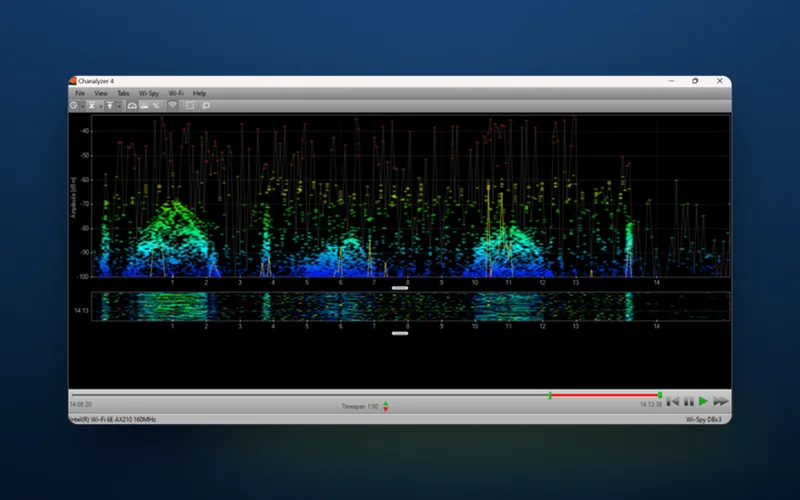
- Minimise interference. Find the source with a spectrum analyser, which sees non-Wi-Fi signals that a Wi-Fi scanner cannot, then move it, or move the Wi-Fi traffic to a less crowded band.
- Use beamforming, which focuses an access point's signal towards each device instead of spreading it evenly.
- Use MIMO (Multiple Input, Multiple Output), where several antennas send and receive at once, making the link faster and more robust.
5. Channels
Each Wi-Fi band is divided into channels, specific frequency ranges within the band that a network transmits on. There are now three bands: 2.4 GHz, 5 GHz, and 6 GHz, which arrived with Wi-Fi 6E and is also used by Wi-Fi 7 (IEEE 802.11be).
- 2.4 GHz is the crowded one. In the UK and Europe it has 13 channels (11 is the US figure), but they overlap, so at the standard 20 MHz width only 1, 6 and 11 run side by side without interfering. Those three also avoid a quieter trap: a handheld set to a US region cannot see channels 12 and 13. On a large site, some access points' 2.4 GHz radios are often best switched off.
- 5 GHz has many more channels with much less overlap, but most are shared with radar. Under Dynamic Frequency Selection (DFS) an access point that detects radar must leave the channel and its devices can drop, and some older handhelds cannot use DFS channels at all.
- 6 GHz is used only by Wi-Fi 6E and Wi-Fi 7 devices, so older equipment does not compete for it. Ofcom opened the lower part, 5925 to 6425 MHz, to UK Wi-Fi in 2020.
Managing channels properly is crucial for performance and for avoiding interference, most of all in dense environments such as office buildings and warehouses, where networks on the same or overlapping channels interfere with each other and users see slower speeds and unstable connections. Your own access points count too: two on the same channel within range of each other share its airtime (co-channel interference), and two on overlapping channels corrupt each other's transmissions (adjacent channel interference). Bonding channels to 40, 80 or 160 MHz gives each device more speed but leaves fewer channels to go round, so dense sites usually do better on 20 or 40 MHz at 5 GHz.
Business access points can select channels automatically, dynamically choosing the least congested, and dual-band and tri-band models spread the load across two or three bands; the Cambium XE3-4 that DW WiFi supplies is a tri-band Wi-Fi 6E example. Automatic is a sensible default, not a guarantee: check the result across the site, and check what your handhelds support before relying on DFS or 6 GHz channels. Our guide to Wi-Fi channels goes further.
Which factor is failing? Read the pattern
To the user, the five look alike: a scanner that keeps dropping out could be in a coverage gap, on a noisy channel or on an overloaded access point. When and where it happens is the first clue.
| When it goes wrong | Suspect first | What settles it |
|---|---|---|
| In the same places every day | Coverage or roaming | Signal and second access point readings at the device, at working height |
| Only at busy times: shift change, lesson change, lunch | Speed (capacity) | Channel utilisation and devices per access point at the peak |
| Only while certain equipment runs | SNR | Spectrum analysis with that equipment running |
| Slow everywhere, despite full bars | Channels | The channel and width plan, and co-channel interference |
| On one model of device only | The device | Its bands, DFS support, drivers and power-saving settings |
| Since something changed: new racking, more stock, a firmware update | Whatever changed | A new survey compared with the last one |
If you are a software provider rolling handhelds out to a customer's site, take these readings before go-live, with the exact model and firmware the customer will use, and you will know whether a fault is the Wi-Fi or your software before they ask. DW WiFi works alongside software providers deploying into their customers' sites throughout Europe.
Book a Wi-Fi survey to find the source of the problem
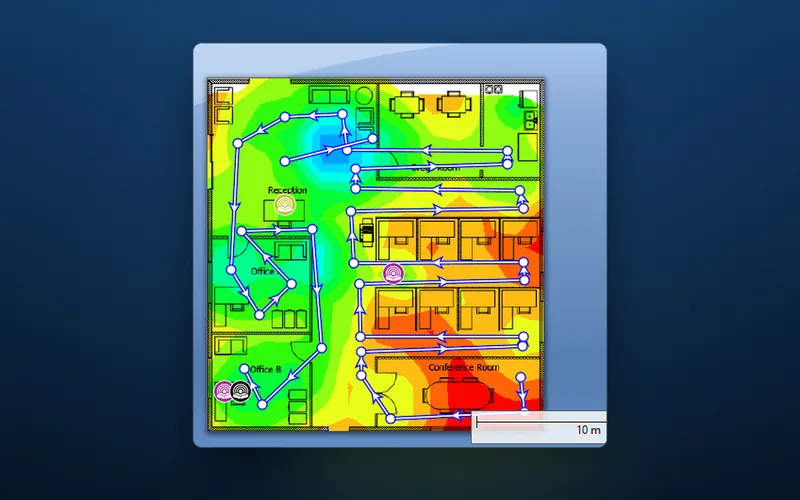
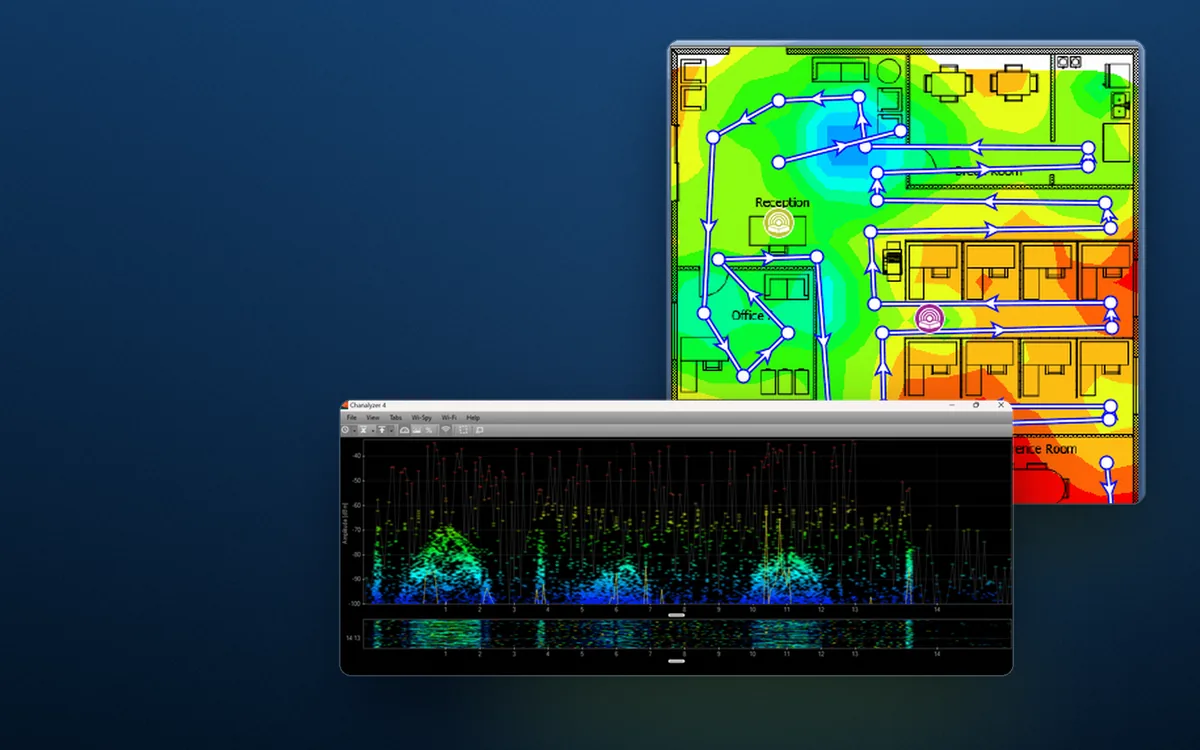
A pattern is a clue, not a diagnosis. Without a clear view of the network's performance, coverage and security weak points, a business is guessing, and a wrong guess means productivity bottlenecks, security breaches and dissatisfied customers. A Wi-Fi survey replaces the guess with measurements: heat maps over your scaled floor plans that show where the network infrastructure is weak and why, so you can head off disruption and run a more productive, efficient workplace. Which survey depends on where you are:
- Installed and not performing: the Wi-Fi Health Check. It is a verification survey with spectrum analysis to find sources of interference, plus a full assessment of how the access points are configured (and the client devices, where relevant), tailored to problems such as co-channel and adjacent channel interference.
- Just installed: a verification survey, to confirm the network delivers what was designed.
- Planning a new network: a predictive survey from your floor plans, or an on-site Wi-Fi site survey.
Every survey starts from scaled floor plans, so have yours to hand, then get in touch with DW WiFi today to talk it through.