The evolution of Wi-Fi: from Wi-Fi 1 (IEEE 802.11b) to Wi-Fi 7
Every Wi-Fi generation from 802.11b in 1999 to Wi-Fi 7, which one to buy now, and how to tell whether a newer generation would fix your site's Wi-Fi at all.

In this article
Wi-Fi has been through seven generations since 1999, from 11 Mbps on one crowded band to multi-gigabit rates across three, and from a simple way to send data without a cable to something most of modern life depends on, warehouses and factories included. If your Wi-Fi is failing now, a newer generation will rarely fix it: drops, dead spots and stalls usually come from where the access points are and how they are set up, and no standard changes that. If you are buying access points anyway, Wi-Fi 6 is the baseline, and Wi-Fi 6E is worth the extra only if 6 GHz handhelds are on the way.
Will a newer generation fix your Wi-Fi?
Match the symptom before you spend anything. Only one of these six common complaints is helped by a newer generation, and only when the handhelds are new too.
- Drops in certain aisles, corners or at the far end of the building. Usually too few access points, or in the wrong places. Measure where the work happens, at handheld height: common design targets are -67 dBm or stronger and a signal-to-noise ratio of 25 dB or more. Below that, the fix is placement. Stock, racking, stainless washdown walls in a food factory and heavy steel in a foundry weaken signal according to the band, not the generation: a newer standard reaches no further, and 6 GHz reaches less far than 5 GHz. Washdown areas also need IP-rated enclosures.
- Fine when the racking was empty, poor once it filled. Stock absorbs and blocks signal, drinks and wet food most of all, because water soaks up radio at these frequencies. A survey done in an empty building, or in a quiet month, measured a different building. Measure again with the racking full.
- Full bars on the handheld, but scans still time out. The handheld hears the access point, but the access point cannot hear the handheld. Access points are often set louder than a battery handheld can answer, so the bars mislead. Turning the access points down, and adding one where that leaves a gap, fixes it.
- A pause of a few seconds when walking from one area to the next. The handheld is clinging to an access point behind it, or logging on from scratch each time it moves. Coverage needs to overlap, so the next access point is strong before the last one fades, and fast roaming needs switching on at both ends.
- Everything slows at the start of a shift, or when a whole class logs on. Too many devices are waiting for the same airtime. First switch off slow data rates nothing uses, cut the number of network names and keep channels narrow. Each network name sends about ten short announcements (beacons) a second at the slowest rate allowed, two to three milliseconds each at 1 Mbps, so four names on three access points sharing a channel use around a quarter of its airtime before any data moves. This is the one complaint a newer generation helps with (see Wi-Fi 6 below), and only with Wi-Fi 6 handhelds.
- One old device holds everyone back. A label printer or vehicle terminal that only speaks 802.11b, or only the old WEP or TKIP encryption, keeps slow rates or weak security switched on for every device. That is a device to replace, not an access point problem.
If you cannot tell which of these you have, measure before you buy: new access points in the same places inherit the same problems.
Which generation should you buy?
- Start with the devices. A connection only uses what both ends support, so a Wi-Fi 6 access point talks to a Wi-Fi 5 handheld in Wi-Fi 5. On a spec sheet, 802.11ac means Wi-Fi 5, 802.11ax Wi-Fi 6, 802.11ax with 6 GHz Wi-Fi 6E, and 802.11be Wi-Fi 7.
- Wi-Fi 6 is the baseline for new access points. Its gains suit many devices sending small, frequent bursts of data, which is how handhelds work, and it still serves older devices.
- Choose Wi-Fi 6E only if 6 GHz devices will arrive within the life of the access points. Some 6E access points can run their 6 GHz radio as a second 5 GHz radio until then, so buying early need not waste it.
- Wait on Wi-Fi 7 until your handhelds have it. Its most useful feature for them, Multi-Link Operation, needs Wi-Fi 7 at both ends.
Take a distribution centre keeping its Wi-Fi 5 handhelds for three more years. New Wi-Fi 6 access points talk to them in Wi-Fi 5, so on day one the pickers notice only what better placement gives them; the Wi-Fi 6 gains arrive as the handhelds are replaced. So the order is survey, then Wi-Fi 6, then let the handheld replacement cycle decide when 6E or 7 is worth paying for.
If you supply the handhelds or their software, five answers from the device's spec shape the site's Wi-Fi as much as the access points do:
- Which 802.11 generation is it?
- Which bands, including 6 GHz?
- Which UK 5 GHz channels? Older equipment may leave out the radar-sharing (DFS) channels, or 149 to 165.
- Does it support WPA3?
- Does it support fast roaming (802.11r)?
The generations at a glance
| Name | Standard | Year | Bands (GHz) | Top rate | What it added |
|---|---|---|---|---|---|
| Wi-Fi 1 | 802.11b | 1999 | 2.4 | 11 Mbps | Wi-Fi in everyday use |
| Wi-Fi 2 | 802.11a | 1999 | 5 | 54 Mbps | The 5 GHz band, OFDM |
| Wi-Fi 3 | 802.11g | 2003 | 2.4 | 54 Mbps | OFDM on 2.4 GHz |
| Wi-Fi 4 | 802.11n | 2009 | 2.4, 5 | 600 Mbps | MIMO, 40 MHz channels |
| Wi-Fi 5 | 802.11ac | 2013 | 5 | 6.9 Gbps | 80 and 160 MHz channels, MU-MIMO |
| Wi-Fi 6 | 802.11ax | 2019 | 2.4, 5 | 9.6 Gbps | OFDMA, Target Wake Time |
| Wi-Fi 6E | 802.11ax | 2021 | 2.4, 5, 6 | 9.6 Gbps | The 6 GHz band |
| Wi-Fi 7 | 802.11be | 2024 | 2.4, 5, 6 | Over 20 Gbps | 320 MHz channels, Multi-Link Operation |
Wi-Fi 1: IEEE 802.11b
IEEE 802.11b was ratified in 1999 and retrospectively labelled Wi-Fi 1. It ran at up to 11 Mbps on the 2.4 GHz band, and it was the standard that made wireless networking cheap enough for everyday use.
Its limits were speed and interference. The 2.4 GHz band is shared with microwave ovens, Bluetooth and other equipment, and 802.11b was easily disrupted by them. The band is also narrow, about 80 MHz, with room for only three channels that do not overlap: 1, 6 and 11. The UK allows channels 1 to 13, but 1, 6 and 11 remain the usual plan.
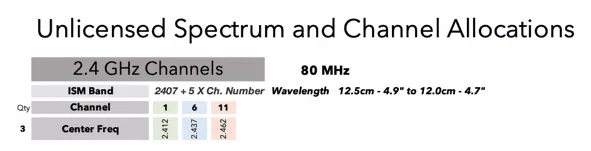
On site: many networks still have 802.11b's rates, 1, 2, 5.5 and 11 Mbps, switched on. A full-size frame sent at 1 Mbps holds the channel about 50 times longer than at 54 Mbps. If nothing still needs them, switching them off gives that airtime back; check first that no old label printer or vehicle terminal relies on them.
Wi-Fi 2 and Wi-Fi 3: IEEE 802.11a and 802.11g
IEEE 802.11a (Wi-Fi 2) and IEEE 802.11g (Wi-Fi 3) arrived within a few years of each other, and both reached 54 Mbps, nearly five times 802.11b. Both used OFDM, which spreads data across many narrow sub-carriers and copes far better with signals echoing off walls and steel. They took different routes:
- 802.11a, ratified in 1999 alongside 802.11b, moved to the less congested 5 GHz band.
- 802.11g, ratified in 2003, stayed on 2.4 GHz, matched the 54 Mbps of 802.11a and remained backward compatible with 802.11b devices.
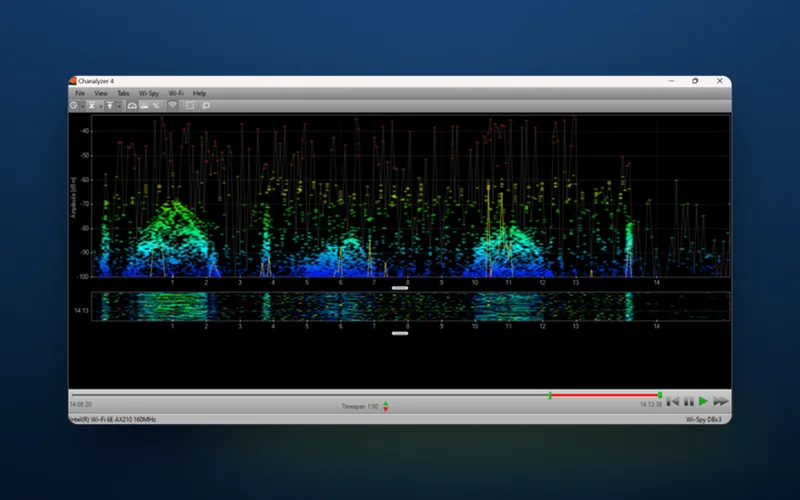
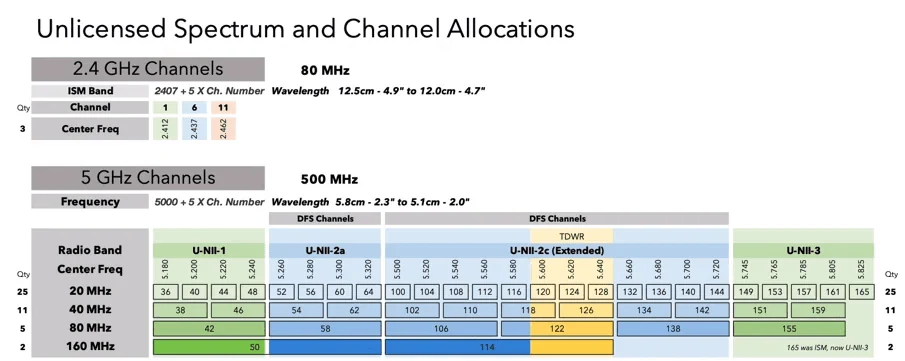
The chart below makes the gain in bandwidth plain: about 80 MHz at 2.4 GHz against 500 MHz at 5 GHz in the US plan shown. Indoors, the UK uses the same 5 GHz channels apart from 144, which gives 24 channels of 20 MHz. Channels 36 to 48 and 149 to 165 carry no radar rules indoors. The rest, 52 to 64 and 100 to 140, share the band with radar and are called DFS channels: an access point must listen for radar before using one and move if it hears any, dropping its devices while it moves. Some older handhelds cannot use them at all.
Wi-Fi 4: IEEE 802.11n, the turning point
IEEE 802.11n, now Wi-Fi 4, was ratified in 2009. It raised the top speed to 600 Mbps, reached significantly further, and was the first standard to cover both 2.4 GHz and 5 GHz.
What made it the turning point was MIMO (Multiple Input Multiple Output): several antennas at each end, transmitting and receiving at once and carrying up to four streams of data side by side. OFDM had taught Wi-Fi to tolerate reflections; MIMO put them to work, using the different paths a signal takes to carry more data over a much stronger, steadier link. 802.11n could also join two 20 MHz channels into one of 40 MHz.
On site: a 40 MHz channel at 2.4 GHz takes half the band, so keep 2.4 GHz at 20 MHz.
Wi-Fi 5: IEEE 802.11ac
IEEE 802.11ac, Wi-Fi 5, was approved by the IEEE in December 2013 and widely adopted from 2014. It is a 5 GHz standard, and it made three main changes:
- Wider channels: 80 MHz, and 160 MHz where there is room.
- More spatial streams: up to eight, against four for Wi-Fi 4.
- Higher-density modulation (256-QAM), which packs more data into each transmission but needs a strong, clean signal, one reason real speeds fall away with distance.
Together these made Wi-Fi 5 several times faster than Wi-Fi 4, and it was sold on bandwidth-hungry uses such as HD video streaming and online gaming. Later Wi-Fi 5 equipment added multi-user MIMO (MU-MIMO), so an access point can send to several devices at once.
On site: a warehouse needs the opposite of a video stream: many devices each sending a little, often. Join the UK's 24 indoor channels into 80 MHz channels and five are left, three of them DFS; at 40 MHz, eleven. Put 30 access points in a distribution centre on 80 MHz and neighbours share channels and take turns, while a handheld sending a scan gains almost nothing from the width. A warehouse is usually better on 20 or 40 MHz.
Wi-Fi 6 and 6E: IEEE 802.11ax
IEEE 802.11ax, or Wi-Fi 6, arrived in 2019, when the Wi-Fi Alliance began certifying devices; the IEEE completed the standard in 2021. Its top speed is 9.6 Gbps, but speed was not the main aim. That figure assumes eight spatial streams on a 160 MHz channel; a two-stream handheld on a 20 MHz channel tops out at 287 Mbps, which is still far more than scanning needs. Wi-Fi 6 is built for efficiency where a high density of devices share one network, on 2.4 GHz as well as 5 GHz. Two technologies do most of the work:
- OFDMA (Orthogonal Frequency-Division Multiple Access) splits a channel into smaller slices, so the access point can serve several devices in one transmission instead of making each wait its turn.
- TWT (Target Wake Time) lets a device and the access point agree when it will next wake, so battery-powered devices sleep for longer and do not all compete for airtime at once.
Between them they make any crowded network, at home or at work, more efficient and cut latency.
On site: at the start of a shift, dozens of handhelds come off charge and start sending scans, each a small burst of data. Wi-Fi 5 gives every burst its own turn on the air; Wi-Fi 6 can carry several in one transmission, if the handhelds are Wi-Fi 6 too.
Wi-Fi 6E: a third band at 6 GHz
Wi-Fi 6E extends Wi-Fi 6 into a third band, 6 GHz, and certification began in January 2021. What it adds is room: with that much new spectrum, channels can be wider, and wider channels raise data speed and throughput. The US plan below has 1,200 MHz, more than the 2.4 and 5 GHz bands put together.
Europe and the UK opened only the lower part of the band, UNII-5. Ofcom made 5925 to 6425 MHz available in 2020, which gives 24 channels of 20 MHz or three of 160 MHz, and the EU followed in 2021. In July 2026 Ofcom decided to open the next 160 MHz, 6425 to 6585 MHz, to Wi-Fi too, but the regulations were still out for consultation in autumn 2026, so check they are in force before planning around anything above 6425 MHz.

On site: 6 GHz is clean because only Wi-Fi 6E and newer devices can use it, and every network on it must use WPA3, with no fallback to WPA2. So a network kept on WPA2 for older handhelds cannot simply extend onto 6 GHz. 6 GHz also loses more through walls than 5 GHz: in a listed building with thick stone walls it will not reach rooms 5 GHz could not, but it adds clean capacity where coverage is already good.
Wi-Fi 7: IEEE 802.11be
Wi-Fi 7 is IEEE 802.11be, and the Wi-Fi Alliance has certified Wi-Fi 7 devices since January 2024. It pushes speed up and latency down again, to meet rising demand for bandwidth and the growing number of IoT devices. Its headline features:
- 320 MHz channels, double the widest in Wi-Fi 6E, in the 6 GHz band only.
- 4096-QAM modulation, carrying more data in each transmission when the signal is strong.
- Multi-Link Operation (MLO), which lets a device use more than one band at once, for more speed or a more dependable connection.
On site: the UK's lower 6 GHz band, 5925 to 6425 MHz, has room for only one 320 MHz channel at a time, and 6425 to 6585 MHz would add room for just one more, so wherever access points can hear each other, 320 MHz is not practical. MLO is what matters for handhelds: a device linked on two bands can carry on through interference on one.
The next generation, IEEE 802.11bn (expected to become Wi-Fi 8), is in development, with reliability rather than raw speed as its main goal.
Three problems every generation has had to solve
Each standard has answered the same three problems while opening up new uses, and each answer leaves something to check today.
- Spectrum congestion. The answer has been more room (5 GHz, then 6 GHz) and better use of it (MIMO, then OFDMA). On a busy site the limit is now how many access points hear each other on each channel, which placement and power settings decide.
- Security concerns. WEP, the original encryption, was broken early; WPA replaced it in 2003, then came WPA2 in 2004 and WPA3 in 2018. If an old handheld is the only reason a network still allows WEP or TKIP (the stopgap encryption in the first WPA), that handheld is the weak point.
- Backward compatibility. Each standard still talks to older devices, so a site can upgrade gradually, but not for free: while an 802.11b device is connected, newer devices first send a short warning at an old, slow rate so it knows to wait, and every device pays for that airtime.
Taken together, the generations have made Wi-Fi far faster and more dependable, and what it carries has widened with them: from web browsing to HD streaming, smart homes and IoT devices, and on working sites the handhelds, label printers and vehicle terminals that keep stock moving.
Every generation has given the access point more to work with; none has changed where it is mounted or how it is set up, which is where most of the six symptoms above start. A Wi-Fi site survey settles how many access points you need and where they go before anything is bought; if the network is already in and struggling, a Wi-Fi Health Check measures which of the six you have.