What a Wi-Fi survey is, and why it matters for your business
What a Wi-Fi survey measures, the signal targets a sound design works to, which of our four surveys fits your premises, and what your business gets back.


In this article
A Wi-Fi survey measures how radio signal really behaves across your premises and tells you how many access points you need, where they go and which channels they use. A scanner that drops out at the end of an aisle, or a video call that freezes in one meeting room, is often down to the building and the access point layout, not the internet line. A survey finds the cause before money goes on the wrong fix.
What is a Wi-Fi survey?
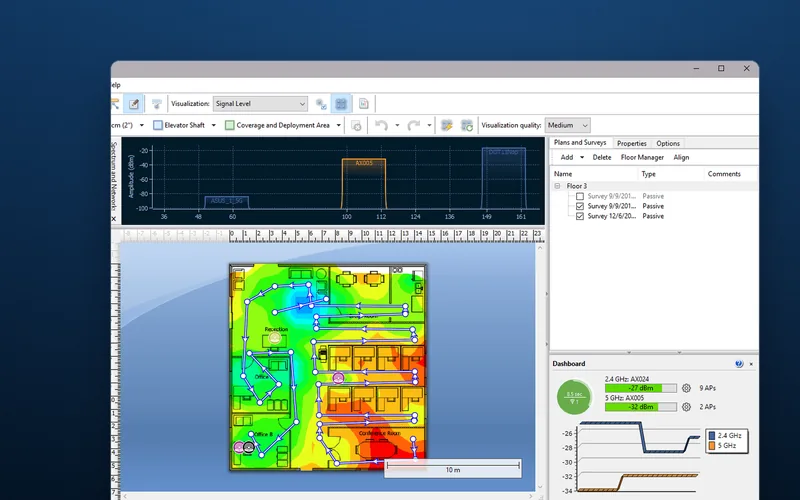
A Wi-Fi survey, also called a wireless survey, is a thorough assessment of a wireless network’s coverage, signal strength and performance across a commercial space. An engineer uses specialised survey software and tools to map the signal throughout the premises over a scaled floor plan, to answer three questions:
- Where is the signal weak? Where devices struggle or drop off.
- What is interfering with it? Other devices and networks on the same radio channels.
- Where should the access points go? The positions that cover everywhere it is needed.
The numbers a survey is judged against
A heat map means nothing without a target. These are the common design targets, checked wherever your devices actually work:
| Measure | Common target | What it tells you |
|---|---|---|
| Signal strength | -67 dBm or stronger | Clear enough for handhelds, voice and video |
| Signal-to-noise ratio (SNR) | 25 dB or more | Signal far enough above the background noise to be usable |
| Channel utilisation | below about 50% | Above that the network feels slow, however strong the signal |
| Roaming overlap | A second access point heard clearly | A moving device can hand over before it loses the first |
Signal values are negative, so closer to zero is stronger, and every 3 dB halves the power: -70 dBm is half the power of -67 dBm. If your handheld or kiosk supplier publishes its own requirement, that wins: ask for it and design to it.
Channels in the UK
In the UK the 2.4 GHz band allows channels 1 to 13, but the standard plan uses only the three that do not overlap: 1, 6 and 11. 5 GHz has up to 25 non-overlapping 20 MHz channels, but 16 are DFS channels shared with radar, which a handheld without DFS support cannot join. Bond them into 80 MHz channels and the 25 become 6, so 40 access points in a warehouse would sit six or seven to a channel, taking turns. Scanners send little data, so 20 MHz usually suits them better. More in our guide to Wi-Fi channels.
Why business premises are hard to cover
Commercial premises add four problems a home never has: large floor areas that need many access points working together; many users sharing each access point’s airtime, so busy areas need capacity as well as coverage; interference from other equipment, from microwave ovens in the 2.4 GHz band to the neighbours’ networks; and seamless roaming, so a scanner on a moving reach truck hands over between access points without dropping its session.
Each kind of building then fights the signal in its own way, which is why a professional survey designs the network around the specific needs of your space, not a standard layout:
- Warehouses with racking
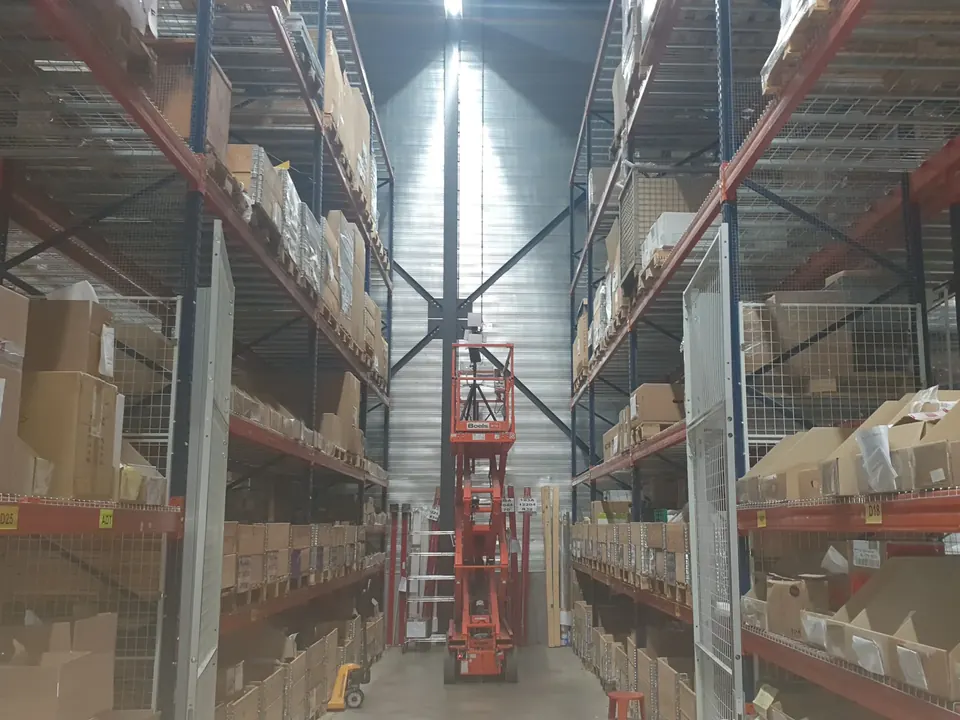
- Stock is the biggest variable: a full aisle of bottled drinks absorbs far more signal than empty cartons, and steel racking reflects it. Survey with the racking stocked as normal, and at the heights devices work: a scanner at the top beam sees a different signal from one on the floor.
- Food factories
- Stainless steel reflects, washdown areas need sealed IP-rated enclosures, and cold stores built from steel-faced insulated panels block most signal, so they usually need an access point inside.
- Steel foundries
- Heavy steel, overhead cranes, heat and dust. Positions must suit the signal and survive the conditions, which is what our own IP-rated enclosures are for.
- Schools
- Capacity before coverage. A class of 30 with a tablet each is 30 devices sharing one access point, so access points belong in the classrooms, not in the corridor behind a wall.
- Listed buildings
- Thick solid walls stop signal room by room, and fixings and cable runs are often restricted, so positions must work and be allowed.
How a survey works, step by step
A live Wi-Fi site survey runs in five stages:
- Initial consultation We establish your business’s specific needs (which devices must work where, at what height, how many at once) and the physical layout of the premises. Every survey starts from a scaled floor plan, so we ask for yours now.
- On-site analysis An engineer visits for a physical examination of the building’s structure (walls, steel, racking and their materials), the existing network equipment and likely sources of interference.
- Signal strength testing Advanced survey tools measure signal strength in different areas of the building, with the building in its working state. For a new design we place a battery-powered access point, measure around it with a laptop at regular intervals, then move it on until the site is covered. Spectrum analysis of the 2.4 GHz and 5 GHz bands finds interference, including non-Wi-Fi sources a phone app cannot see.
- Data analysis The software combines the measurements and we analyse them for patterns, signal drop zones (anywhere signal or SNR falls below what your devices need) and the best access point positions.
- Report and recommendations A detailed report on the current state of your Wi-Fi network and our recommendations for improving it: heat maps of signal strength, coverage, throughput and channel overlap, plus photographs of the proposed access point positions.
Step 3 can be passive, listening to what every access point broadcasts (signal, noise, channel use), or active, connecting as your device would to measure throughput, latency, packet loss and roaming. Where handhelds roam or voice runs, the active result is what proves the design. More in our essential guide to Wi-Fi surveys.
Which survey do you need?
We offer four, each described in full on our Wi-Fi services page. The rule of thumb: if the building is still on paper, predict; where the building or the devices fight the signal, measure on site; once installed, verify.
| Your situation | Survey | What it settles |
|---|---|---|
| A new building, refit or first network, with scaled plans | Predictive survey | Access point numbers, positions and models before you buy. Each wall gets a signal loss by material and thickness, so it is only as good as the plans. |
| Racking, steel, cold stores, thick stone, or handhelds that roam | Site survey | A design measured in your real building, as above. |
| A new network, or new devices about to go live on an existing one | Verification survey | What the network actually delivers, measured with every access point running. |
| A network already causing problems | Health check | A verification survey plus a full review of the access point configuration (and client devices where relevant), to find causes such as co-channel interference. |
A new building often needs two: a predictive design before you buy, then a verification survey once installed, to test the model against the real building. If you deploy software and handhelds into customers’ sites, a verification survey before go-live gives both of you a measured record of the network the rollout depends on. A small office with one or two access points and nothing that roams may not need a survey at all, so ask first.
What a survey does for your business
- Connectivity where you need it. Staff, visitors and clients stay connected throughout the premises, including the far end of the aisle and the top beam, because the survey measured those places.
- Higher productivity. A stable connection ends the dropouts and slow spells behind repeated scans, waiting picks and frozen calls.
- Lower cost. You buy the access points the building needs, where it needs them: none added to cover doubt, and no return visit for a dead zone found after go-live. A predictive survey settles the count before you buy.
- Room to grow. A new mezzanine, a cold store or twice the handhelds can be planned against the measured building as the business grows, not guessed.
- Better security. Not a full security audit, but a survey sees every network in range, so it can expose unauthorised access points and open or weakly secured networks that put sensitive business data at risk (our business Wi-Fi security guide covers closing them).
Two typical scenarios
These are illustrations of how a survey plays out, not named client jobs.
A large retail store
Customers complain they cannot get online in store. The survey shows why: the access points sit in the stockroom, and tall metal shelving leaves the far side of the shop floor below target. The network is redesigned with access points over the shop floor, where the heat map showed the gaps. The connectivity complaints stop, and shoppers who stay connected have one less reason to leave: a better customer experience that supports longer dwell time and more sales.
A corporate office
Video calls break up in the conference rooms. The survey finds them served through the walls by access points in the corridor, so every laptop in a full meeting shares a weakened signal with the open-plan office. It identifies the need for additional access points inside the rooms. Once they are in, video call quality improves significantly and meetings stop losing time to frozen calls.
Choosing a survey partner
A survey is only as good as the engineer behind it, so choose an experienced, reliable partner. Four questions sort them:
- Experience of commercial spaces: what have they surveyed that looks like your building, whether racking, stainless steel or stone walls?
- Advanced tools and technology: will they bring proper survey software and a spectrum analyser, or walk round with a phone app?
- Comprehensive reporting with recommendations you can act on: can you see a sample report, and what targets is the design built to? Without targets, a report cannot say whether the network passes.
- Ongoing support: who do you call when something changes, and will they advise on maintaining the network afterwards?
DW WiFi has more than 20 years of experience developing and deploying Wi-Fi in schools, warehouses, hotels, listed buildings, office blocks, food factories and steel foundries. Our particular strength is data capture in manufacturing and warehousing, and we work alongside software providers to deploy Wi-Fi into their customers’ sites across Europe. For CabinetPro, a regular client, we work out the best positions for its stainless steel touchscreen PCs and kiosks.
We always use Dave for our wifi surveys, he is reliable, friendly and above all, very experienced.
Is a survey worth it?
Where Wi-Fi carries work you are paid for (picks, scans, sales, lessons), yes. A survey is a strategic investment in the building’s infrastructure, like the racking or the power, not a technical exercise bolted on at the end, and Wi-Fi that performs as it should pays back in operational efficiency (scans and picks that do not wait), customer satisfaction (fewer complaints) and ultimately the bottom line (access points bought once, in the right places).
To get a quote moving, send these with your enquiry:
- A scaled floor plan of the areas to cover, with the number of floors.
- The devices that must work (make and model) and where, including at height.
- Any limits on fixings, cable runs, or when each area can be reached.
- Where and when today’s problems happen, if you have a network.
To see exactly what an on-site survey delivers, read about our Wi-Fi site surveys.